Keywords System
This document describes the purpose and usage of the InaSAFE keywords system.
Info
Please also refer to the documentation on the
keywords wizard
Purpose
The keywords system is used by impact functions
Each input dataset used by InaSAFE needs to have an accompanying keywords file. The purpose of the keywords file is to provide additional metadata needed by the impact functions. For example, the keywords file will indicate whether a given dataset should be treated as a hazard or an impact layer. It is also used to indicate the context of the layer (e.g. "it's a flood layer", "it's an earthquake layer").
By convention and expectation, the keywords file should be named with the same base name of the GIS datasource it accompanies. For example a flood dataset saved as
C:\\gisdata\\flood.tif
would need to have an accompanying keywords file saved as:
C:\\gisdata\\flood.keywords
Note
We recommend that you avoid using spaces in your file names and file paths!
The InaSAFE plugin provides an editor for these keywords. The purpose of this document is to describe the keywords editor and to provide guidelines as to the use of keywords.
Note
Currently keywords are not validated by the library. This means that if you misspell a keyword, use the wrong letter case (e.g. upper case instead of lower case) or provide the wrong keyword for the context (e.g. provide a subcategory of flood to an exposure category), the system will not be able to determine what to do with the file. For that reason you should follow the guidelines below carefully to ensure you have entered your keywords correctly.
Guidelines
In this section we lay out the guidelines for keyword usage.
Category
Every dataset should have a category assigned to it. The category should be written in lower case.
========    ==============
Key         Allowed Values
========    ==============
category    exposure
category    hazard
========    ==============
Example keywords file entry: ::
category: hazard
Subcategory
The selection of a subcategory value is dependent on the category:
Valid subcategories for category 'hazard':
===========    ==============
Key            Allowed Values
===========    ==============
subcategory    earthquake
subcategory    flood
subcategory    generic
subcategory    tephra*
subcategory    tsunami
subcategory    volcano
===========    ==============
- tephra is volcanic ashfall
Valid subcategories for category 'exposure':
===========    ==============
Key            Allowed Values
===========    ==============
subcategory    population
subcategory    road
subcategory    structure
===========    ==============
Example keywords file entry: ::
category: hazard subcategory: flood
Units
The units keyword is used to indicate the metric or imperial units represented by each data entity (a grid cell or a vector feature) in a layer.
Valid units for hazard subcategories
Valid units for subcategory 'flood' or subcategory 'tsunami':
=====    ==============
Key      Allowed Values
=====    ==============
units    metres
units    feet
units    wet / dry
units    normalised
=====    ==============
metres: Metres are a metric unit of measure. There are 100 centimetres in one metre. In this case metres are used to describe the water depth.
feet: Feet are an imperial unit of measure. There are 12 inches in one foot and three feet in one yard. In this case feet are used to describe the water depth.
wet / dry: This is a binary description for an area. The area is either wet (affected by flood water) or dry (not affected by flood water). This unit does not describe how wet or dry an area is.
normalised: Normalised data can be hazard or exposure data where the values have been classified or coded.
Valid units for subcategory 'volcano' or subcategory 'tephra':
=====    ===================
Key      Allowed Values
=====    ===================
units    normalised
units    volcano categorical
=====    ===================
normalised: Normalised data can be hazard or exposure data where the values have been classified or coded.
volcano categorical: This is a ternary description for an area. The area is either has low, medium, or high impact from the volcano.
Valid units for subcategory 'earthquake':
=====    ==============
Key      Allowed Values
=====    ==============
units    MMI
units    normalised
=====    ==============
MMI: The Modified Mercalli Intensity (MMI) scale describes the intensity of ground shaking from a earthquake based on the effects observed by people at the surface.
normalised: Normalised data can be hazard or exposure data where the values have been classified or coded.
Valid units for exposure subcategories
Valid units for subcategory 'population':
=====    ================
Key      Allowed Values
=====    ================
units    people per pixel
=====    ================
people per pixel: Count is the number of people in each cell. For example population count might be measured as the number of people per pixel in a raster data set. This unit is relevant for population rasters in geographic coordinates.
Valid units for subcategory 'structure':
=====    ================
Key      Allowed Values
=====    ================
units    building type
units    building generic
=====    ================
building type: Building type is a unit that represents the type of the building. In this case, building type will be used to group the results of the impact function.
building generic: Building generic means that there is no building type attribute in the exposure data.
Valid units for subcategory 'road':
=====    ==============
Key      Allowed Values
=====    ==============
units    Road Type
=====    ==============
Road Type: Road type is a unit that represent the type of the road. In this case, road type will be used to group the result of impact function.
Datatype
The datatype keyword indicates what kind of geospatial data is represented (Numeric, Polygon, Line, Point).
Assumptions
The following assumptions are made about keywords, which may or may not be programmatically enforced by the InaSAFE library and GUI:
- There should only be one keyword for a given key in the keywords file.
- Keywords for category are enforced to be one of 'hazard' or 'exposure' by the GUI.
- All keywords should be in lower case, without spaces with the exception of 'Title' whose value may contain both spaces and mixed case letters.
- Values for keywords should generally be lower case, with the exception of datatype values, which may be in upper case (e.g. MMI)
- Keys and values should not contain colons. In the keyword editor, any colons will be replaced with a full stop character.
- All other keywords and values that do not fit the above domain lists may be used but they may produce undesired results.
Translations
Although InaSAFE is available in different languages, the 'key' in the keywords files should always be written in English.
Keywords for remote and non-file based layers
If you are using a PostgreSQL, WFS, Spatialite or other non-file based
resource, you can still create keywords.
In these circumstances the keywords will be written to a sqlite database - by
default this database is stored as keywords.db within the
InaSAFE root directory.
You may wish to use a different location for the keywords.db keywords
database - you can configure this by using the InaSAFE options dialog.
The options dialog can be launched by clicking on the InaSAFE plugin
toolbar's options icon (as shown below) or by going to
Plugins ‣ InaSAFE ‣ InaSAFE Options.

The options button
When the options dialog is opened, the keywords database path can be specified under the Advanced tab under Keyword cache for remote datasources as shown below.
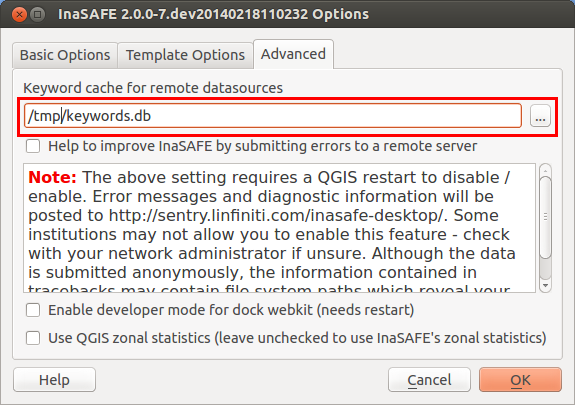
Path to options database
Note
- Support for remote and non-file based layers was added in InaSAFE version 0.3.
- The database can be opened using a sqlite editor such as sqliteman, but the data in the keywords table is not intended to be human readable or edited. The table columns consist of an MD5 hash based on the URI for the datasource (typically the database connection details) and a blob which contains the keywords as a pickled python dictionary.
See ./options for more information about the InaSAFE options dialog.
Sharing your keywords cache
In theory you can place the keywords file on a network share and create a shared keyword repository in a multi-user environment, but you should note that the layer URI hashes need to be identical in order for a layer's keyword to be found. This means that, for (contrived) example: ::
connection=postgresql,user=joe,password=secret,resource=osm_buildings
would not be considered the same as ::
connection=postgresql,user=anne,password=secret,resource=osm_buildings
since the user credentials differ, resulting in a different URI. To work around this you could create a common account so that every user will effectively use the same URI to load that layer e.g. ::
connection=postgresql,user=public,password=secret,resource=osm_buildings
For certain resources (e.g. ArcInfo coverages, Spatialite databases) where the keywords cache is also used, you should take care to use a common mount point or network share to access the data if you wish to successfully hit the cache with the layer's URI. For example you could have all users mount your data to the same place. Under Unix-like operating systems this could look something like this:
/mnt/gisdata/jk.sqlite
Under Windows you could always use the same drive letter and path to the share, e.g.:
Z:\\gisdata\\jk.sqlite
Getting help
If you need help using the keywords editor, click on the Help button at the bottom of the dialog and this page will be displayed.
Note
This document is automatically generated. It can be regenerated by running the python script /inasafe-doc/scripts/generate_keywords.py.
This document was generated based on InaSAFE 2.1.0b0.