Writing Impact Functions
This document explains the purpose of impact functions and shows how to write them. Some familiarity with the Python programming language will be helpful to fully appreciate this section. See also Impact Functions for information about existing impact functions in InaSAFE. Three examples of impact functions for common combinations of input types are given in the sections Impact function for raster hazard and raster exposure data, Impact function for raster hazard and vector (point or polygon) exposure data and Impact function for polygon hazard and vector point exposure data.
Note
This section is still work in progress
What is an impact function?
An impact function is a short Python code that InaSAFE calls to make a specific analyses. All impact functions take as inputs one hazard layer and one exposure layer. All impact functions return
- a layer that represents he result of the calculation (the impact layer).
- style information for the impact layer.
- a textual report typically summarising statistical information about the impact such as estimated fatilities or number of buildings affected.
Layers can be either raster or vector types. See Data Types for a complete list of admissible input layer types that can be sensibly handled by impact functions.
Impact functions also specify which layer types they can work with and thus directly control under which circumstances they are made available to the user in the impact function menu. See Controlling which layer types impact functions work with for more details.
Creating impact functions
All impact functions follow a particular overall structure as outlined below:
Import required modules
This section identifies functionality that is needed for the impact function in question. As a minimum, one must import functionality specific to the impact function framework, but depending on the usage other standard Python modules may be imported here. A minimal import section contains:
from safe.impact_functions.core import (FunctionProvider,
                                        get_hazard_layer,
                                        get_exposure_layer,
                                        get_question,
                                        get_function_title)

from safe.common.tables import Table, TableRow
The imported elements are
- FunctionProvider
- Base class that all impact function classes must inherit from for InaSAFE to recognise them. Click on link or see examples below for more details.
- get_hazard_layer
- Helper function to extract hazard layer from input.
- get_exposure_layer)
- Helper function to extract exposure layer from input.
- get_question
- Function to paraphrase the selected scenario based on titles of hazard, exposure and impact function.
- get_function_title
- Helper function which provides title of impact function.
- Table
- Class for representing tables for use in the InaSAFE reports.
- TableRow
- Class for representing one table row in a table.
Additionally, and depending on the type of the resulting layer, a typical import section will include either:
from safe.storage.raster import Raster
or:
from safe.storage.vector import Vector
Define the impact function class
The impact function is represented by a Python class. It must inherit from the class FunctionProvider which is what will make it part of the InaSAFE system:
class SomeImpactFunction(FunctionProvider):
    """Example impact function
The impact function class must have some special tags in its docstring which are used to identify it and decide which layer types it is valid for. They are:
| author: | Name of the individual or organisation who wrote the impact function |
|---|---|
| rating: | A numeric rating from 1 to 4 signifying a quality rating of the function (1 is worst and 4 is best). This is used in conjunction with similar ratings of input layers and combined into a rating of the resulting impact layer. The idea is that a final result is never better than the worst of the inputs and the calculation. |
| param requires: | This precedes an arbitrary boolean expression combining statements involving keyword and values. The expression must be valid Python statements and the keywords and values must be defined for each input layer - e.g. by using the keywords editor or by manually editing the keywords file. One keyword, layertype, which takes the values ‘raster’ or ‘vector’ is always present and is inferred automatically by InaSAFE. For more information about keywords please refer to Keywords System and refer to the examples below. |
Following the docstring is a collection of variables that define and document the impact function. They are
| title: | Specifies the title of the impact function as displayed in the InaSAFE user interface |
|---|---|
| parameters: | A (possibly ordered) dictionary of parameters that can be configured from the user interface. Anything listed here can be modified at runtime by clicking the pencil symbol next to the impact function. In this case it is the threshold used to define what water level signals evacuation. |
In addition, there is a collection of text variables used for various levels of documentation of this impact function. They are synopsis, actions, detailed_description, permissible_hazard_input, permissible_exposure_input and limitation. See examples below for more possible usages.
Impact function algorithm
TBA
Impact function for raster hazard and raster exposure data
The example below is a simple impact function that calculates an expected number of people in need of evacuation in a flood event as well as an estimate of supplies required.
Import section
This section identifies functionality that is needed for the impact function in question. As a minimum, one must import functionality specific to the impact function framework, but in this case we also need numpy for computations, tables for reporting and raster to form the resulting impact layer:
import numpy
from safe.impact_functions.core import (FunctionProvider,
                                        get_hazard_layer,
                                        get_exposure_layer,
                                        get_question,
                                        get_function_title)

from safe.common.tables import Table, TableRow
from safe.storage.raster import Raster
Impact function class
The impact function itself is embodied in a Python class with a doc string:
class FloodPopulationEvacuationFunction(FunctionProvider):
    """Impact function for flood evacuation (tutorial)

    :author AIFDR
    :rating 4
    :param requires category=='hazard' and \
                    subcategory in ['flood', 'tsunami'] and \
                    layertype=='raster' and \
                    unit=='m'

    :param requires category=='exposure' and \
                    subcategory=='population' and \
                    layertype=='raster'
    """

    title = 'be evacuated'

    synopsis = ('To assess the impacts of (flood or tsunami) inundation '
                'on population.')
    actions = ('Provide details about how many people would likely need '
               'to be evacuated, where they are located and what resources '
               'would be required to support them.')
    detailed_description = ('The population subject to inundation '
                            'exceeding a threshold (default 1m) is '
                            'calculated and returned as a raster layer.'
                            'In addition the total number and the required '
                            'needs in terms of the BNPB (Perka 7) ')

    permissible_hazard_input = ('A hazard raster layer where each cell '
                                'represents flood depth (in meters).')
    permissible_exposure_input = ('An exposure raster layer where each '
                                  'cell '
                                  'represent population count.')
    limitation = ('The default threshold of 1 meter was selected based on '
                  'consensus, not hard evidence.')

    parameters = {'threshold': 1.0}
The class name FloodPopulationEvacuationFunction is used to uniquely identify this impact function and it is important to make sure that no two impact functions share the same class name. If they do, one of them will be ignored.
The doc string defines the author, the rating and the requirements that input layers must fulfil for this impact function. In this case, there must be a hazard layer with subcategory of either ‘flood’ or ‘tsunami’, with layertype being ‘raster’ and unit of meters. The other input must be tagged as ‘exposure’ with subcategory ‘population’ and also having layertype ‘raster’. Except for layertype which is automatically inferred by InaSAFE all other keywords must be specified with each layer e.g. by using the InaSAFE keyword editor or by manually editing the keywords file. See also Keywords System.
The rest of this section comprise the documentation variables and the parameters dictionary which in this case makes one variable available for interactive modification from the user interface. In this case, the threshold used to determine whether people should be evacuated is made configurable. The default value is set to 1m.
Impact function algorithm
The actual calculation of the impact function is specified as a method call called run. This method will be called by InaSAFE with a list of the 2 selected layers:
def run(self, layers):
    """Impact function for flood population evacuation

    Input
      layers: List of layers expected to contain
          H: Raster layer of flood depth
          P: Raster layer of population data on the same grid as H

    Counts number of people exposed to flood levels exceeding
    specified threshold.

    Return
      Map of population exposed to flood levels exceeding the threshold
      Table with number of people evacuated and supplies required
    """

    # Identify hazard and exposure layers
    inundation = get_hazard_layer(layers)  # Flood inundation [m]
    population = get_exposure_layer(layers)

    question = get_question(inundation.get_name(),
                            population.get_name(),
                            self)
The typical way to start the calculation is to explicitly get a handle to the hazard layer and the exposure layer. In this case we name them as inundation and population respectively.
We also use a built-in function get_question to paraphrase the selected scenario based on titles of hazard, exposure and impact function. For example, if the hazard and exposure layers had titles “A flood in Jakarta like in 2007” and “People”, then the paraphrased question for this impact function would become:
In the event of a flood in Jakarta like in 2007 how many people might be evacuated.
The next typical step is to extract the numerical data to be used. In this case we assign the configurable parameter threshold to a variable of the same name, and because both input layers are raster data (we know this because of the requirements section) we take the numerical data as arrays. InaSAFE has a preprocessing step that automatically reprojects, aligns, resamples and possibly rescales data so that the impact function can assume the two arrays are compatible and be used safely in numerical calculations:
# Determine depths above which people are regarded affected [m]
# Use thresholds from inundation layer if specified
threshold = self.parameters['threshold']

# Extract data as numeric arrays
D = inundation.get_data(nan=0.0)  # Depth

# Calculate impact as population exposed to depths > max threshold
P = population.get_data(nan=0.0, scaling=True)
The method get_data() returns an array if the layer is raster and takes two arguments:
| nan: | Specify the value to use where nodata is available. In this case we use 0.0 as we only want to count hazard pixels with flooding and exposure pixels with non-zero population. |
|---|---|
| scaling: | Optional argument controlling if data is to be scaled. In this case we set it to True which means that if the corresponding raster layer was resampled by InaSAFE, the values will be correctly scaled by the squared ratio between its current and native resolution. |
Note
# FIXME (Ole): Tim - how do we cross reference docstrings? The problem is that we can’t drop labels into them because they are auto-generated?
See :ref:/api-docs/safe/storage/raster.html#safe.storage.raster.Raster.get_data for more details on the get_data() method.
Now we are ready to implement the desired calculation. In this case it is very simple as we just want to sum over population pixels where the inundation depth exceeds the threshold. As both inundation and population are numpy arrays, this is achieved by the code:
# Create new array with positive population counts only for
# pixels where inundation exceeds threshold.
I = numpy.where(D >= threshold, P, 0)

# Count population thus exposed to inundation
evacuated = int(numpy.sum(I))

# Count total population
total = int(numpy.sum(P))
We can now use this estimate to calculate the needs required. In this case it is based on an Indonesian standard:
# Calculate estimated needs based on BNPB Perka 7/2008 minimum bantuan

# 400g per person per day
rice = int(evacuated * 2.8)

# 2.5L per person per day
drinking_water = int(evacuated * 17.5)

# 15L per person per day
water = int(evacuated * 105)

# assume 5 people per family (not in perka)
family_kits = int(evacuated / 5)

# 20 people per toilet
toilets = int(evacuated / 20)
With all calculations complete, we can now generate a report. This usually takes the form of a table and InaSAFE provide some primitives for generating table rows etc. InaSAFE operates with two tables, impact_table which is put on the printable map and impact_summary which is shown on the screen. They can be identical but are usually slightly different. We also define a title for the generated map:
# Generate impact report for the pdf map
table_body = [question,
              TableRow([('People in %.1f m of water' %
                         threshold),
                        '%s' % evacuated],
                       header=True),
              TableRow('Map shows population density needing '
                       'evacuation'),
              TableRow(['Needs per week', 'Total'],
                       header=True),
    ['Rice [kg]', rice],
    ['Drinking Water [l]', drinking_water],
    ['Clean Water [l]', water],
    ['Family Kits', family_kits],
    ['Toilets', toilets]]
impact_table = Table(table_body).toNewlineFreeString()

# Extend impact report for on-screen display
table_body.extend([TableRow('Notes', header=True),
                   'Total population: %s' % total,
                   'People need evacuation if flood levels '
                   'exceed %(eps).1f m' % {'eps': threshold},
                   'Minimum needs are defined in BNPB '
                   'regulation 7/2008'])
impact_summary = Table(table_body).toNewlineFreeString()

map_title = 'People in need of evacuation'
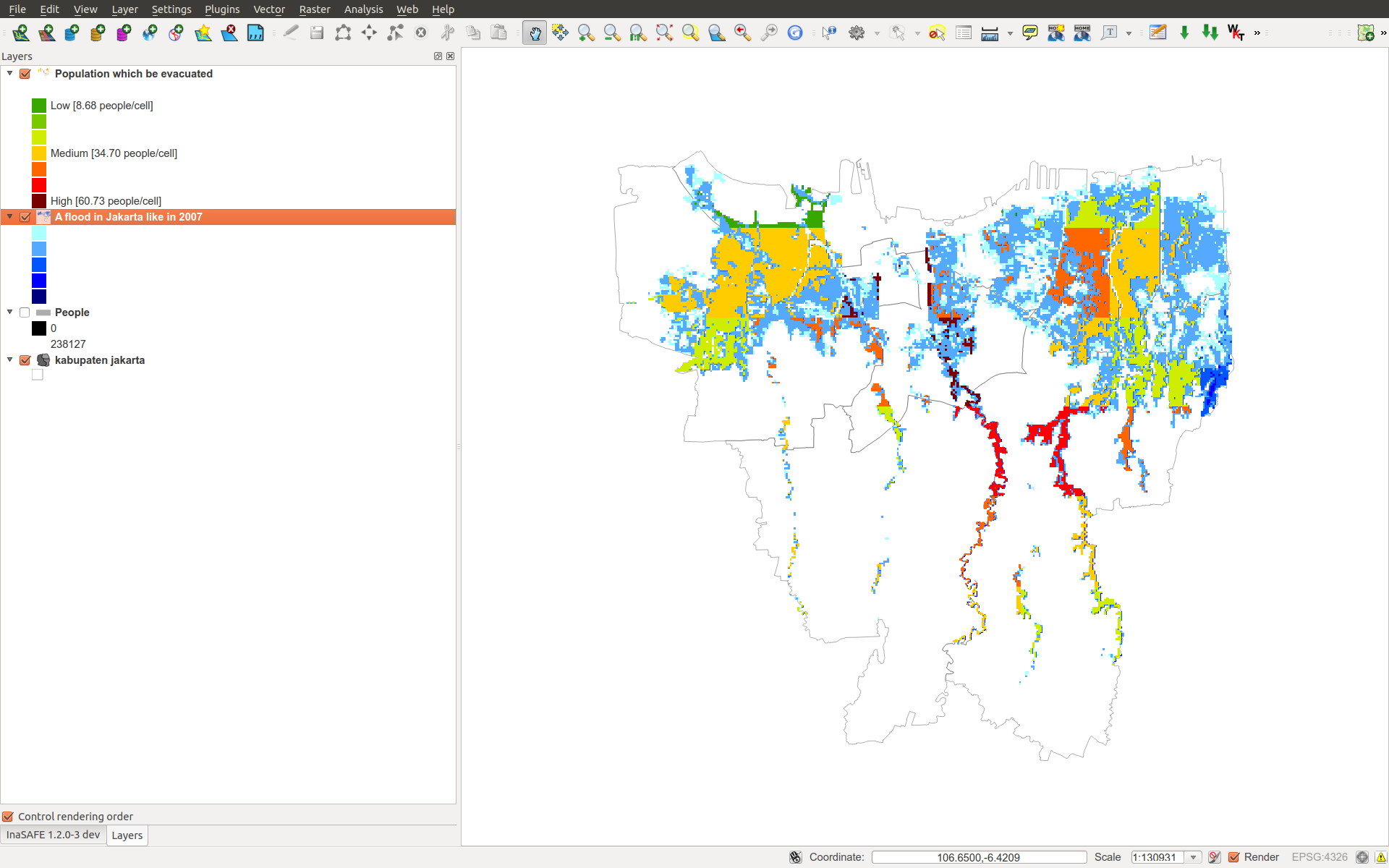
The impact grid calculated above must be displayed as a layer so needs some appropriate colouring. In this case we define 8 classes and assign a colour for each. We set the lowest class to be transparent and the others solid as that will give a nice visual appearance showing only areas that are impacted. We label class 1 as low, class 4 as medium and class 7 as high:
# Generate 8 equidistant classes across the range of flooded population
# 8 is the number of classes in the predefined flood population style
# as imported
classes = numpy.linspace(numpy.nanmin(I.flat[:]),
                         numpy.nanmax(I.flat[:]), 8)

# Define 8 colours - on for each class
colours = ['#FFFFFF', '#38A800', '#79C900', '#CEED00',
           '#FFCC00', '#FF6600', '#FF0000', '#7A0000']

# Create style associating each class with a colour and transparency.
style_classes = []
for i, cls in enumerate(classes):
    if i == 0:
        # Smallest class has 100% transparency
        transparency = 100
    else:
        # All the others are solid
        transparency = 0

    # Create labels for three of the classes
    if i == 1:
        label = 'Low [%.2f people/cell]' % cls
    elif i == 4:
        label = 'Medium [%.2f people/cell]' % cls
    elif i == 7:
        label = 'High [%.2f people/cell]' % cls
    else:
        label = ''

    # Style dictionary for this class
    d = dict(colour=colours[i],
             quantity=cls,
             transparency=transparency,
             label=label)
    style_classes.append(d)

# Create style info for impact layer
style_info = dict(target_field=None,  # Only for vector data
                  legend_title='Population Density',
                  style_classes=style_classes)
Finally, we create and return a new raster object based on the calculated impact grid I. We also assign the same projection and geotransform as the hazard layer, give it a suitable name, pass the tables and title as keywords and provide the generated style.
InaSAFE assumes that every impact function returns a raster or vector layer.
# Create raster object and return
R = Raster(I,
           projection=inundation.get_projection(),
           geotransform=inundation.get_geotransform(),
           name='Population which %s' % get_function_title(self),
           keywords={'impact_summary': impact_summary,
                     'impact_table': impact_table,
                     'map_title': map_title},
           style_info=style_info)
return R
This function is available in full at ../static/flood_population_evacuation_impact_function.py
Output
The output of this function looks like this:
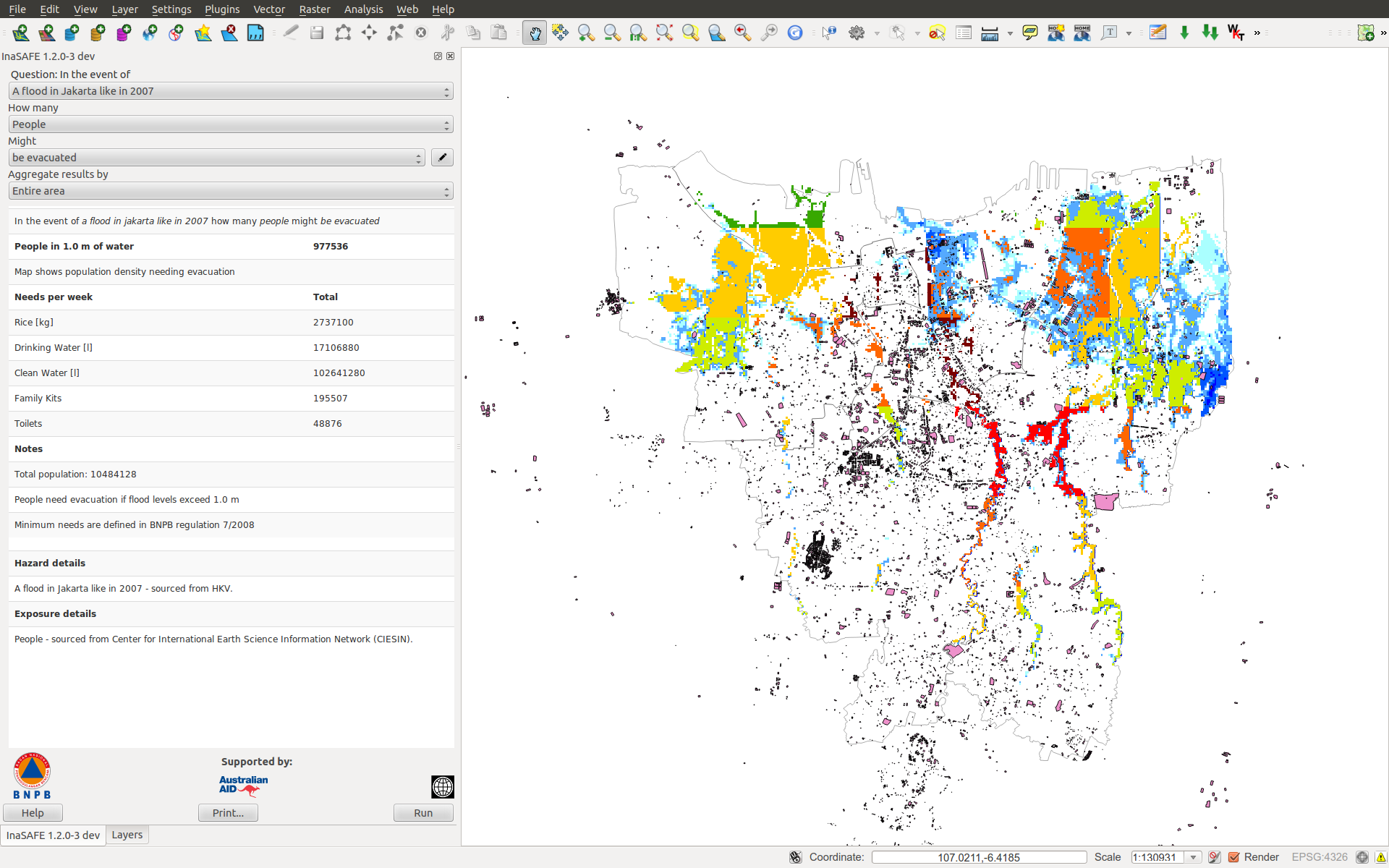
and the legend defined in the style_info section is available in the layer view
Impact function for raster hazard and vector (point or polygon) exposure data
The example below is a simple impact function that identifies which buildings (vector data) will be affected by earthquake ground shaking (raster data).
TBA
Impact function for polygon hazard and vector point exposure data
The example below is a simple impact function that identifies which buildings (vector data) will be affected by certain volcanic hazard areas (vector polygon data).
TBA
Assigning hazard values to exposure data
In many cases, there is a need to tag the exposure layer with values from the hazard layer in order to calculate the impact. Typical examples include interpolation from gridded hazard data to point data (interpolation), from polygon hazard data to point data or, indeed, from polygon data to gridded population data. InaSAFE provides one general mechanism for this purpose called ``assign_hazard_values_to_exposure_data’‘and it is typically called in the beginning of the impact function to generate an intermediate layer that has all information about both hazard and exposure. A call looks like:
I = assign_hazard_values_to_exposure_data(H, E,
                                          attribute_name='depth')
In this case H could be either raster or polygon vector data and E polygon or point vector data. In either case the result I represents the exposure data but with an additional attribute added containing the hazard level. If H is polygon data, all its attributes will be transferred to I. If H is raster_data and hence has only one value, that value will be assigned to a new attribute in I as specified by the keyword argument attribute_name - in this example ‘depth’. See full documentation of this function in section Data Types.
Deploying new impact functions
To make a new impact function visible to InaSAFE it has to be placed in a subdirectory under safe/impact_functions relative to where it is installed. This will typically be something like .qgis/python/plugins/inasafe.
There are a number of subdirectories with existing impact functions organised by hazard. The new impact function can use either of them or be located in a new subdirectory with the same __init_.py file as the existing ones.
Next time InaSAFE is loaded, the new impact function will be included and provided its keywords match those of the input layers it will be available to run.
Controlling which layer types impact functions work with
Each impact function has a requirements section embedded in its doc string that specifies which type of input layers it can work with. The requirements take the form of one or more statements that specify which keywords and values input layers must have for the impact function to run. InaSAFE uses this mechanism to determine which impact functions appear in the menu for a given selection of hazard and exposure layers.
For example, the impact function for earthquake fatality estimation which works with two raster input layers has the requirements section
:param requires category=='hazard' and \
                subcategory=='earthquake' and \
                layertype=='raster' and \
                unit=='MMI'

:param requires category=='exposure' and \
                subcategory=='population' and \
                layertype=='raster'
This means that the impact function will only be selected if it is presented with two input layers whose associated keywords match these requirements. For more information about keywords please refer to Keywords System.

Table Of Contents
- Writing Impact Functions
- What is an impact function?
- Creating impact functions
- Impact function for raster hazard and raster exposure data
- Impact function for raster hazard and vector (point or polygon) exposure data
- Impact function for polygon hazard and vector point exposure data
- Assigning hazard values to exposure data
- Deploying new impact functions
- Controlling which layer types impact functions work with